


Is Vibe coding serious?
Can it be used in production?
Yes, with a bit of planning and Specification Driven Development.
I have been playing around with speckit for Console and Web Development and was impressed with the kind of tooling (AI agent, skills, documentation) support.
Adding numbers for a Console App was fun and simple.
I tried it out with a Web App for a Stopwatch with a time display, and 3 buttons – Start, Stop and Reset.
What I liked?
UI Contract
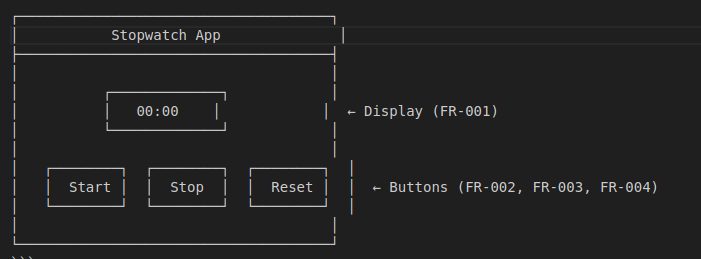
Having a UI contract and getting it checked by the Information Architect before implementation is key.
The UI contract can also be handed over the Designer for creating styleguide conform Designs
ui-contracts.md
# UI Contract: Stopwatch Web Application
**Feature**: 001-stopwatch
**Date**: 2026-09-06
**Spec**: [spec.md](../spec.md)
**Plan**: [plan.md](../plan.md)
**Data Model**: [data-model.md](../data-model.md)
## Overview
This document defines the user interface contract for the stopwatch web application. It specifies what users see and how they interact with the application, serving as the “API” between the user and the stopwatch feature.
## Page Structure
“`
┌─────────────────────────────────────┐
│ Stopwatch App │
├─────────────────────────────────────┤
│ │
│ ┌─────────────┐ │
│ │ 00:00 │ │ ← Display (FR-001)
│ └─────────────┘ │
│ │
│ ┌────────┐ ┌────────┐ ┌────────┐ │
│ │ Start │ │ Stop │ │ Reset │ │ ← Buttons (FR-002, FR-003, FR-004)
│ └────────┘ └────────┘ └────────┘ │
│ │
└─────────────────────────────────────┘
“`
## Display Element
### Contract: Time Display
**Selector**: `#display` (or `.stopwatch-display`)
**Properties**:
– **Content**: Formatted time string
– **Format**:
– MM:SS when elapsed time < 1 hour (e.g., “05:30”, “00:45”)
– HH:MM:SS when elapsed time >= 1 hour (e.g., “01:05:30”, “23:59:59”)
– **Font**: Monospace or system default, minimum 24px
– **Color**: High contrast (e.g., black on white, white on dark)
– **Alignment**: Center
**Requirements**:
– FR-001: Human-readable format
– FR-007: Leading zeros for single-digit values
– SC-003: 100% of users can correctly read the display
**Update Behavior**:
– Updates at least once per second while timer is running (SC-002)
– No visible lag or stuttering during updates
—
## Control Elements
### Contract: Start Button
**Selector**: `#start` (or `.start-btn`)
**Properties**:
– **Label**: “Start” or “Resume” based on context
– **Initial State**: Enabled
– **Disabled When**: Timer is already running
**Behavior** (FR-002):
– **Action**: Initiates timer from 00:00:00 or resumes from paused state
– **Response Time**: Within 200ms of click (SC-005)
– **State Transition**: reset → running, or paused → running
– **Side Effects**:
– Starts timer interval (1000ms)
– Records start timestamp
– Enables Stop button
– Disables Start button (optional)
**Acceptance Scenarios** (from US1):
1. **Given** stopwatch is reset (00:00:00), **When** clicked, **Then** timer begins from zero
2. **Given** stopwatch is paused, **When** clicked, **Then** timer resumes from paused time
3. **Given** stopwatch is running, **When** clicked, **Then** nothing happens
—
### Contract: Stop Button
**Selector**: `#stop` (or `.stop-btn`)
**Properties**:
– **Label**: “Stop” or “Pause”
– **Initial State**: Disabled
– **Enabled When**: Timer is running
**Behavior** (FR-003):
– **Action**: Pauses timer at current elapsed time
– **Response Time**: Within 200ms of click (SC-005)
– **State Transition**: running → paused
– **Side Effects**:
– Stops timer interval
– Records pause timestamp and elapsed time
– Enables Start button (for resume)
– Disables Stop button (optional)
**Acceptance Scenarios** (from US1):
1. **Given** stopwatch is running, **When** clicked, **Then** timer pauses and display freezes
2. **Given** stopwatch is not running, **When** clicked, **Then** nothing happens
—
### Contract: Reset Button
**Selector**: `#reset` (or `.reset-btn`)
**Properties**:
– **Label**: “Reset” or “Clear”
– **Initial State**: Enabled
**Behavior** (FR-004):
– **Action**: Sets timer back to 00:00:00
– **Response Time**: Within 1 second of click (SC-001)
– **State Transition**: Any state → reset
– **Side Effects**:
– Stops timer interval if running
– Resets all state fields
– Updates display to “00:00”
– Disables Stop button
– Enables Start button
**Acceptance Scenarios** (from US2):
1. **Given** stopwatch is stopped with elapsed time, **When** clicked, **Then** display returns to 00:00:00
2. **Given** stopwatch is running, **When** clicked, **Then** timer stops and display returns to 00:00:00
3. **Given** stopwatch is already at 00:00:00, **When** clicked, **Then** display remains at 00:00:00
—
## Accessibility Contract (FR-008)
All UI elements MUST be accessible via standard controls:
| Element | Accessibility Requirements |
|———|—————————-|
| Display | Screen reader accessible, ARIA label: “Stopwatch time display” |
| Start Button | Keyboard accessible (Enter/Space), ARIA label: “Start stopwatch” |
| Stop Button | Keyboard accessible (Enter/Space), ARIA label: “Stop stopwatch” |
| Reset Button | Keyboard accessible (Enter/Space), ARIA label: “Reset stopwatch” |
**Additional Requirements**:
– Focus indicators visible for keyboard navigation
– Sufficient color contrast (minimum 4.5:1 for text)
– Touch targets minimum 48x48px for mobile
—
## Browser Compatibility Contract
**Supported Browsers**:
– Chrome (latest 2 versions)
– Firefox (latest 2 versions)
– Edge (latest 2 versions)
– Safari (latest 1 version)
**Polyfills**: None required – uses standard ES6+ features supported in all target browsers
—
## Error Handling Contract
**Client-Side Errors**:
– JavaScript errors: Display user-friendly message in console, continue with graceful degradation
– Timer drift: Correct on next interval tick (accumulated error < 1 second over 1 hour per SC-004)
**Edge Cases** (from spec):
1. **24+ hour runtime**: Display continues beyond 24:00:00 (no wrap-around)
2. **Rapid button clicks**: Each click registers, but invalid transitions are ignored
3. **Tab focus loss**: Timer may pause when tab is backgrounded (browser-dependent), resumes when tab regains focus
—
## Performance Contract
| Metric | Target | Source |
|——–|——–|——–|
| Display update frequency | >= 1 update/second | SC-002 |
| Button response time | < 200ms | SC-005 |
| Timer accuracy | Within 1 second over 1 hour | SC-004 |
| Page load time | < 2 seconds on typical broadband | Implicit |
| Memory usage | < 50MB | Implicit |
—
## Validation Scenarios
These scenarios can be used to validate the UI contract implementation:
### Scenario 1: Start from Reset
1. Navigate to application
2. Verify display shows “00:00”
3. Verify Start button is enabled
4. Verify Stop button is disabled
5. Click Start
6. Verify timer starts counting up
7. Verify display updates at least once per second
### Scenario 2: Stop and Resume
1. Start timer
2. Let it run for 10+ seconds
3. Click Stop
4. Verify timer pauses
5. Verify display shows elapsed time (e.g., “00:15”)
6. Click Start (Resume)
7. Verify timer resumes from paused time
### Scenario 3: Reset
1. Start timer and let it run
2. Click Stop
3. Click Reset
4. Verify display returns to “00:00”
5. Click Start
6. Verify timer starts from 00:00
### Scenario 4: Format Transition
1. Start timer
2. Let it run until it reaches 1 hour (3600 seconds)
3. Verify display changes from MM:SS to HH:MM:SS format
4. Verify “01:00:00” is displayed
### Scenario 5: Leading Zeros
1. Start timer
2. Let it run for 9 seconds
3. Verify display shows “00:09” (not “0:9”)
4. Let it run for 5 minutes 9 seconds
5. Verify display shows “05:09” (not “5:9”)
—
## Testing Contract
### Unit Testing (xUnit)
**Testable Components**:
– Time formatting logic (`formatTime` function)
– State management functions
– Display update calculations
**Test Categories**:
– Format validation (FR-001, FR-007)
– State transition validation (US1, US2)
– Edge case handling
### E2E Testing (Playwright)
**Testable Behaviors**:
– All user scenarios from spec
– Button interactions and responses (SC-001, SC-005)
– Display update frequency (SC-002)
– Timing accuracy (SC-004)
– Display readability (SC-003)
**Test Coverage**:
– Chrome, Firefox, WebKit browsers
– Desktop viewport (1280×720 minimum)
– Keyboard navigation (FR-008)
Data Model
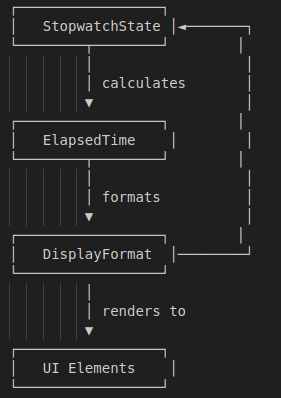
The data model will help the new developers understand and work with the project.
Visual documetation says more than words.
data-model.md
# Data Model: Stopwatch
**Feature**: 001-stopwatch
**Date**: 2026-09-06
**Spec**: [spec.md](./spec.md)
**Plan**: [plan.md](./plan.md)
**Research**: [research.md](./research.md)
## Overview
This document describes the data entities and their relationships for the stopwatch feature. Since this is a client-side web application with no backend, all data exists in the browser’s memory during a session.
## Entities
### Entity 1: StopwatchState
**Description**: Represents the current operational state of the stopwatch. Maps to “Stopwatch State” key entity from spec.
**Source**: Client-side JavaScript (`wwwroot/js/stopwatch.js`)
**Fields**:
| Field | Type | Description | Validation | Initial Value |
|——-|——|————-|————|—————|
| `state` | Enum | Current state of stopwatch | Must be one of: ‘reset’, ‘running’, ‘paused’ | ‘reset’ |
| `startTime` | number (timestamp) | When the stopwatch was started (milliseconds since epoch) | Must be >= 0, null when reset | null |
| `pauseTime` | number (timestamp) | When the stopwatch was paused (milliseconds since epoch) | Must be >= startTime when paused, null when not paused | null |
| `elapsedWhenPaused` | number | Elapsed time in milliseconds when paused | Must be >= 0 | 0 |
**State Transitions**:
“`
reset (startTime=null, pauseTime=null, elapsedWhenPaused=0)
→ Start button clicked
running (startTime=timestamp, pauseTime=null)
→ Stop button clicked
paused (pauseTime=timestamp, elapsedWhenPaused=elapsed)
→ Start button clicked (resume)
running (startTime=original start, pauseTime=null, adjust elapsedWhenPaused)
→ Reset button clicked
reset (all fields reset to initial)
“`
**Business Rules**:
– FR-006: Only one timer instance active at a time (single global state object)
– Start when already running: ignored (per US1 acceptance scenario 4)
– Stop when already stopped: ignored
– Reset when running: stops then resets (per US2 acceptance scenario 2)
—
### Entity 2: ElapsedTime
**Description**: Represents the measured duration. Maps to “Elapsed Time” key entity from spec.
**Source**: Client-side JavaScript (derived from StopwatchState)
**Fields**:
| Field | Type | Description | Validation | Derived From |
|——-|——|————-|————|————–|
| `totalMilliseconds` | number | Total elapsed time in milliseconds | Must be >= 0 | Calculated |
| `totalSeconds` | number | Total elapsed time in seconds | Must be >= 0 | totalMilliseconds / 1000 |
| `hours` | number | Hours component | Must be >= 0 | floor(totalSeconds / 3600) |
| `minutes` | number | Minutes component | Must be >= 0, < 60 | floor((totalSeconds % 3600) / 60) |
| `seconds` | number | Seconds component | Must be >= 0, < 60 | totalSeconds % 60 |
**Calculation Logic** (from StopwatchState):
“`javascript
// When running
if (state === ‘running’) {
const now = Date.now();
const elapsedSinceStart = now – startTime;
totalMilliseconds = elapsedWhenPaused + elapsedSinceStart;
}
// When paused
if (state === ‘paused’) {
totalMilliseconds = elapsedWhenPaused;
}
// When reset
if (state === ‘reset’) {
totalMilliseconds = 0;
}
“`
**Business Rules**:
– FR-001: Must display in human-readable format (MM:SS or HH:MM:SS)
– FR-007: Must display leading zeros for single-digit values
—
### Entity 3: DisplayFormat
**Description**: Represents how elapsed time is visually formatted. Maps to “Display Format” key entity from spec.
**Source**: Client-side JavaScript formatting function
**Fields**:
| Field | Type | Description | Validation | Values |
|——-|——|————-|————|——–|
| `formatString` | string | The formatted time string | Must match pattern | “MM:SS” or “HH:MM:SS” |
| `hours` | number | Hours component | Must be >= 0 | 0-24+ |
| `minutes` | number | Minutes component | Must be 0-59 | 00-59 |
| `seconds` | number | Seconds component | Must be 0-59 | 00-59 |
**Format Rules** (from FR-001):
– If totalSeconds < 3600 (1 hour): Use MM:SS format
– If totalSeconds >= 3600: Use HH:MM:SS format
**Formatting Function**:
“`javascript
function formatTime(totalSeconds) {
const hours = Math.floor(totalSeconds / 3600);
const minutes = Math.floor((totalSeconds % 3600) / 60);
const seconds = Math.floor(totalSeconds % 60);
// FR-007: Leading zeros
const pad = (n) => n.toString().padStart(2, ‘0’);
if (hours > 0) {
// HH:MM:SS format
return `${pad(hours)}:${pad(minutes)}:${pad(seconds)}`;
} else {
// MM:SS format
return `${pad(minutes)}:${pad(seconds)}`;
}
}
“`
—
### Entity 4: UI Elements
**Description**: The DOM elements that display and control the stopwatch.
**Source**: `wwwroot/index.html`
**Fields**:
| Field | Type | DOM Selector | Purpose |
|——-|——|————–|———|
| `display` | HTMLElement | `#display` or `.display` | Shows formatted elapsed time (FR-001) |
| `startButton` | HTMLButtonElement | `#start` or `.start-btn` | Triggers start/resume (FR-002) |
| `stopButton` | HTMLButtonElement | `#stop` or `.stop-btn` | Triggers pause (FR-003) |
| `resetButton` | HTMLButtonElement | `#reset` or `.reset-btn` | Triggers reset (FR-004) |
**Validation Rules**:
– FR-008: Must be accessible via standard UI controls (mouse/touch)
– All buttons must be enabled/disabled based on current state (optional UX enhancement)
—
## Relationships
“`
┌─────────────────┐
│ StopwatchState │◄───────┐
└────────┬────────┘ │
│ │
│ calculates │
▼ │
┌─────────────────┐ │
│ ElapsedTime │ │
└────────┬────────┘ │
│ │
│ formats │
▼ │
┌─────────────────┐ │
│ DisplayFormat │────────┘
└─────────────────┘
│
│ renders to
▼
┌─────────────────┐
│ UI Elements │
└─────────────────┘
“`
## Data Flow
1. **User clicks Start**:
– StopwatchState transitions to ‘running’
– startTime set to Date.now()
– Timer interval starts (1000ms)
2. **Timer ticks** (every 1000ms):
– ElapsedTime calculated from StopwatchState
– DisplayFormat generated from ElapsedTime
– UI Elements updated with formatted string
3. **User clicks Stop**:
– StopwatchState transitions to ‘paused’
– pauseTime set to Date.now()
– elapsedWhenPaused calculated
– Timer interval stops
4. **User clicks Reset**:
– StopwatchState transitions to ‘reset’
– All state fields reset
– Timer interval stopped if running
– Display shows “00:00”
## Validation Summary
All entities map to key entities defined in spec.md. All functional requirements (FR-001 through FR-008) are addressed by the data model and their relationships.
## Testing Strategy
### Unit Tests (xUnit)
– Test `formatTime()` function with boundary values (0, 9, 59, 60, 3599, 3600, 3661 seconds)
– Test state transitions in StopwatchState
– Test ElapsedTime calculations
### E2E Tests (Playwright)
– Validate display updates in real browser
– Test all button interactions and state flows
– Verify formatting transitions at 1 hour boundary
– Validate all user stories (US1, US2, US3) end-to-end
Research
Different decisions made based on the specification and clarification
research.md
# Research: Stopwatch Web Application
**Feature**: 001-stopwatch
**Date**: 2026-09-06
**Spec**: [spec.md](./spec.md)
**Plan**: [plan.md](./plan.md)
## Technical Decisions
### Decision 1: ASP.NET Core 8.0 with Kestrel
**Context**: User requirement to build a web app using ASP.NET (.NET 8.0 and C# 12) with no backend, hosted using Kestrel.
**Decision**: Use ASP.NET Core 8.0 with Kestrel as a static file server.
**Rationale**:
– ASP.NET Core 8.0 is the latest LTS release with full cross-platform support
– Kestrel is the built-in, high-performance web server for ASP.NET Core
– “No backend” means no server-side logic – the app serves only static files (HTML, CSS, JS)
– This approach leverages ASP.NET Core’s `UseStaticFiles()` middleware to serve the `wwwroot` folder
– Minimal server code required (just Program.cs with basic setup)
**Alternatives considered**:
– Pure static site with Nginx/Apache: Rejected because user specifically wants ASP.NET with Kestrel
– Blazor WASM: Rejected because it requires more complex setup and the stopwatch can be simpler
– Node.js/Express: Rejected because user specified .NET 8.0 and C# 12
**Implementation Notes**:
– Create minimal ASP.NET Core Web App (not Web API)
– Configure Kestrel to listen on desired port
– Enable static file serving
– All stopwatch logic runs client-side in JavaScript
—
### Decision 2: Client-Side JavaScript for Stopwatch Logic
**Context**: Stopwatch requires real-time updates, button interactions, and time display. User specified “no backend”.
**Decision**: Implement all stopwatch functionality in client-side JavaScript.
**Rationale**:
– Stopwatch is a purely client-side concern (timing, UI updates)
– No server communication needed for core functionality
– JavaScript provides `setInterval()` for timer updates
– DOM manipulation for display updates
– No latency from server round-trips
– Works offline once page is loaded
**Alternatives considered**:
– Server-side timing with SignalR: Rejected – adds unnecessary complexity and server load
– Blazor Server: Rejected – requires persistent connection, “no backend” requirement
– WebAssembly: Rejected – overkill for simple stopwatch
**Implementation Notes**:
– Use `Date.now()` for precise timing
– Use `setInterval()` with 1000ms for second-level updates (matches SC-002)
– Format time as MM:SS or HH:MM:SS based on duration
– Store state in JavaScript variables (running, paused, elapsed time)
—
### Decision 3: Project Structure
**Context**: Single-page web application with static frontend.
**Decision**: Standard ASP.NET Core Web App structure with `wwwroot` for static files.
**Rationale**:
– Follows .NET conventions
– `wwwroot` is the standard folder for static assets
– Kestrel automatically serves files from `wwwroot` when `UseStaticFiles()` is called
– Clean separation between server configuration and client code
**Implementation Notes**:
– `Program.cs`: Minimal ASP.NET Core setup with Kestrel and static files
– `wwwroot/index.html`: Main page with stopwatch UI
– `wwwroot/css/style.css`: Basic styling
– `wwwroot/js/stopwatch.js`: Stopwatch logic
—
### Decision 4: Time Formatting
**Context**: FR-001 requires human-readable format (MM:SS for <1 hour, HH:MM:SS for 1+ hours). FR-007 requires leading zeros.
**Decision**: Format time client-side in JavaScript with leading zeros.
**Rationale**:
– Simple to implement with JavaScript’s Date/math functions
– No server dependency
– Meets all display requirements from spec
**Implementation Notes**:
“`javascript
function formatTime(totalSeconds) {
const hours = Math.floor(totalSeconds / 3600);
const minutes = Math.floor((totalSeconds % 3600) / 60);
const seconds = totalSeconds % 60;
if (hours > 0) {
return `${hours.toString().padStart(2, ‘0’)}:${minutes.toString().padStart(2, ‘0’)}:${seconds.toString().padStart(2, ‘0’)}`;
} else {
return `${minutes.toString().padStart(2, ‘0’)}:${seconds.toString().padStart(2, ‘0’)}`;
}
}
“`
—
### Decision 5: Testing Approach
**Context**: SC-001 through SC-005 define measurable outcomes. User requirement: Unit testing using xUnit and E2E testing with Playwright.
**Decision**:
– **Unit Testing**: xUnit for server-side and JavaScript logic testing
– **E2E Testing**: Playwright for end-to-end browser automation
**Rationale**:
– **xUnit**: Standard .NET testing framework, integrates well with ASP.NET Core. Can test server startup, static file serving, and JavaScript utility functions.
– **Playwright**: Cross-browser automation for validating user scenarios (US1, US2, US3). Can verify display updates, button interactions, timing accuracy, and format transitions.
– Combination provides both unit-level validation and full end-to-end scenario coverage
– Meets user’s explicit requirement for both testing approaches
**Alternatives considered**:
– NUnit: Similar to xUnit, but xUnit is more idiomatic for .NET Core
– Jasmine/Mocha: JavaScript testing frameworks, but Playwright provides better E2E coverage
– Manual testing only: Rejected – lacks reproducibility and automation
**Implementation Notes**:
– xUnit tests in `tests/StopwatchWebApp.Tests/UnitTests/`
– Playwright tests in `tests/StopwatchWebApp.Tests/IntegrationTests/` or separate `tests/Playwright/`
– Test time formatting logic in unit tests
– Test button behaviors and user journeys in E2E tests
– Validate all acceptance scenarios from spec
—
## Dependencies
| Dependency | Version | Purpose | License |
|————|———|———|———|
| .NET SDK | 8.0 | Core runtime | MIT |
| ASP.NET Core | 8.0 | Web framework | MIT |
| Kestrel | Built-in | Web server | MIT |
| xUnit | 2.4.x | Unit testing framework | Apache 2.0 |
| xUnit.runner.visualstudio | 2.4.x | xUnit test runner | Apache 2.0 |
| Microsoft.NET.Test.Sdk | 17.0.x | Test SDK | MIT |
| Playwright | 1.40.x | E2E testing framework | Apache 2.0 |
| Microsoft.Playwright | 1.40.x | .NET bindings for Playwright | Apache 2.0 |
## Testing Strategy Details
### xUnit Testing
**Test Categories**:
1. **Server-Side Tests** (C#):
– Verify static file serving configuration
– Test Kestrel startup
– Validate response headers for static files
2. **JavaScript Utility Tests** (C# via JS interop or Node.js):
– Test `formatTime()` function with various inputs
– Validate leading zero formatting
– Test format transition at 1 hour boundary
**Example Test Structure**:
“`csharp
// tests/StopwatchWebApp.Tests/UnitTests/TimeFormatterTests.cs
public class TimeFormatterTests
{
[Theory]
[InlineData(0, “00:00”)]
[InlineData(9, “00:09”)]
[InlineData(59, “00:59”)]
[InlineData(60, “01:00”)]
[InlineData(3599, “59:59”)]
[InlineData(3600, “01:00:00”)]
[InlineData(3661, “01:01:01”)]
public void FormatTime_ReturnsCorrectFormat(int totalSeconds, string expected)
{
// Test implementation
var result = TimeFormatter.FormatTime(totalSeconds);
Assert.Equal(expected, result);
}
}
“`
### Playwright E2E Testing
**Test Categories**:
1. **User Story 1 – Start and Stop Timing**:
– Test clicking Start begins timer
– Test clicking Stop pauses timer
– Test clicking Start resumes from paused state
– Test clicking Start when running does nothing
2. **User Story 2 – Reset**:
– Test Reset from stopped state
– Test Reset from running state
– Test Reset from reset state
3. **User Story 3 – View Elapsed Time**:
– Test display updates at least once per second
– Test MM:SS format for < 1 hour
– Test HH:MM:SS format for >= 1 hour
– Test leading zeros
4. **Success Criteria Validation**:
– SC-001: Buttons respond within 1 second
– SC-002: Display updates >= 1x/second
– SC-003: Display is readable
– SC-004: Accuracy within 1s over 1 hour
– SC-005: Button response < 200ms
**Example Test Structure**:
“`csharp
// tests/StopwatchWebApp.Tests/IntegrationTests/StopwatchE2ETests.cs
using Microsoft.Playwright;
public class StopwatchE2ETests : IAsyncLifetime
{
private IPlaywright _playwright;
private IBrowser _browser;
private IPage _page;
public async Task InitializeAsync()
{
_playwright = await Playwright.CreateAsync();
_browser = await _playwright.Chromium.LaunchAsync(new BrowserTypeLaunchOptions
{
Headless = true
});
_page = await _browser.NewPageAsync();
await _page.GotoAsync(“http://localhost:5000”);
}
public async Task DisposeAsync()
{
await _browser.CloseAsync();
_playwright.Dispose();
}
[Fact]
public async Task Start_Button_StartsTimer()
{
// Arrange
var initialDisplay = await _page.TextContentAsync(“#display”);
Assert.Equal(“00:00”, initialDisplay.Trim());
// Act
await _page.ClickAsync(“#start”);
await Task.Delay(1500); // Wait 1.5 seconds
// Assert
var updatedDisplay = await _page.TextContentAsync(“#display”);
Assert.NotEqual(“00:00”, updatedDisplay.Trim());
}
[Fact]
public async Task Stop_Button_PausesTimer()
{
// Arrange
await _page.ClickAsync(“#start”);
await Task.Delay(1000);
var firstReading = await _page.TextContentAsync(“#display”);
// Act
await _page.ClickAsync(“#stop”);
await Task.Delay(1500); // Wait while paused
// Assert
var secondReading = await _page.TextContentAsync(“#display”);
Assert.Equal(firstReading, secondReading);
}
[Fact]
public async Task Reset_Button_ResetsTimer()
{
// Arrange
await _page.ClickAsync(“#start”);
await Task.Delay(1000);
await _page.ClickAsync(“#stop”);
// Act
await _page.ClickAsync(“#reset”);
// Assert
var display = await _page.TextContentAsync(“#display”);
Assert.Equal(“00:00”, display.Trim());
}
[Fact]
public async Task Display_ShowsLeadingZeros()
{
// Arrange
await _page.ClickAsync(“#start”);
await Task.Delay(9000); // Wait 9 seconds
// Act
await _page.ClickAsync(“#stop”);
var display = await _page.TextContentAsync(“#display”);
// Assert
Assert.Equal(“00:09”, display.Trim());
}
[Fact]
public async Task Display_TransitionsToHHMMSS_AtOneHour()
{
// This test would need to be optimized – waiting 1 hour is impractical
// Alternative: Mock the timer or use test doubles
// For demonstration, showing the concept:
// Arrange – would need a way to fast-forward time
// Act – run timer to 3600 seconds
// Assert – display shows “01:00:00”
}
}
“`
**Playwright Configuration**:
“`json
// playwright.config.json
{
“projects”: [
{
“name”: “chromium”,
“use”: {
“browserName”: “chromium”,
“viewport”: { “width”: 1280, “height”: 720 }
}
},
{
“name”: “firefox”,
“use”: {
“browserName”: “firefox”,
“viewport”: { “width”: 1280, “height”: 720 }
}
},
{
“name”: “webkit”,
“use”: {
“browserName”: “webkit”,
“viewport”: { “width”: 1280, “height”: 720 }
}
}
]
}
“`
## Best Practices References
– [Microsoft: Create an ASP.NET Core app with .NET 8.0](https://learn.microsoft.com/en-us/aspnet/core/tutorials/min-web-api?view=aspnetcore-8.0)
– [Microsoft: Serve static files in ASP.NET Core](https://learn.microsoft.com/en-us/aspnet/core/fundamentals/static-files?view=aspnetcore-8.0)
– [xUnit Documentation](https://xunit.net/)
– [Playwright for .NET](https://playwright.dev/dotnet/)
– [Microsoft: Unit testing in .NET](https://learn.microsoft.com/en-us/dotnet/core/testing/)
– [Playwright GitHub](https://github.com/microsoft/playwright)
– [MDN: JavaScript Date and Time](https://developer.mozilla.org/en-US/docs/Web/JavaScript/Guide/Dates)
– [MDN: setInterval()](https://developer.mozilla.org/en-US/docs/Web/API/setInterval)
Quickstart
And a quickstart to dive into the Web App and see it running and tested
quickstart.md
# Quickstart: Stopwatch Web Application
**Feature**: 001-stopwatch
**Date**: 2026-09-06
**Spec**: [spec.md](./spec.md)
**Plan**: [plan.md](./plan.md)
**Data Model**: [data-model.md](./data-model.md)
**Contracts**: [contracts/](./contracts/)
## Overview
This guide provides runnable validation scenarios to prove the stopwatch feature works end-to-end. It covers prerequisites, setup, running, and validating the application.
## Prerequisites
### Software Requirements
| Component | Version | Download | Verification |
|———–|———|———-|————–|
| .NET SDK | 8.0.x | [dotnet.microsoft.com](https://dotnet.microsoft.com) | `dotnet –version` |
| Git | Any recent | [git-scm.com](https://git-scm.com) | `git –version` |
| Node.js | 18.x or 20.x | [nodejs.org](https://nodejs.org) | `node –version` |
| Playwright | 1.40.x | `npm install -g @playwright/test` | `playwright –version` |
### Development Environment
– Operating System: Windows 10/11, macOS 10.15+, or Linux (Ubuntu 20.04+, Fedora, etc.)
– Browser: Chrome, Firefox, Edge, or Safari (latest versions)
– Internet connection (for NuGet packages on first build)
—
## Setup
### 0. Install Testing Dependencies
“`bash
# Install Playwright CLI globally
npm install -g @playwright/test
# Install Playwright browsers
playwright install chromium firefox webkit
“`
### 1. Clone or Navigate to Repository
“`bash
# If starting fresh, create the project structure
mkdir -p StopwatchApp/src/StopwatchWebApp/wwwroot/{css,js}
mkdir -p StopwatchApp/src/StopwatchWebApp/Properties
mkdir -p StopwatchApp/tests/StopwatchWebApp.Tests/{UnitTests,IntegrationTests}
“`
### 2. Create ASP.NET Core Web App
“`bash
# From the repository root (StopwatchApp)
cd StopwatchApp
# Create a new ASP.NET Core Web App (not Web API)
dotnet new web -n StopwatchWebApp -f net8.0 –no-https
# Navigate to project
cd src/StopwatchWebApp
“`
### 3. Add Testing Packages
“`bash
# From src/StopwatchWebApp
cd ../..
# Add xUnit packages to test project
dotnet add tests/StopwatchWebApp.Tests package xunit -v 2.4.2
dotnet add tests/StopwatchWebApp.Tests package xunit.runner.visualstudio -v 2.4.5
dotnet add tests/StopwatchWebApp.Tests package Microsoft.NET.Test.Sdk -v 17.6.0
# Add Playwright .NET package
dotnet add tests/StopwatchWebApp.Tests package Microsoft.Playwright -v 1.40.0
# Alternatively, create a separate solution file
# dotnet new sln -n StopwatchApp
dotnet sln add src/StopwatchWebApp/StopwatchWebApp.csproj
dotnet sln add tests/StopwatchWebApp.Tests/StopwatchWebApp.Tests.csproj
“`
### 3. Project Configuration
The default `dotnet new web` template already includes:
– Kestrel as the web server
– Static file serving enabled
– `wwwroot` folder for static content
No additional configuration needed for basic functionality.
### 4. Create Client-Side Files
Create the following files in `wwwroot/`:
**wwwroot/index.html**:
“`html
<!DOCTYPE html>
<html lang=”en”>
<head>
<meta charset=”UTF-8″>
<meta name=”viewport” content=”width=device-width, initial-scale=1.0″>
<title>Stopwatch</title>
<link rel=”stylesheet” href=”/css/style.css”>
</head>
<body>
<div class=”stopwatch-container”>
<h1>Stopwatch</h1>
<div id=”display” class=”display” aria-label=”Stopwatch time display”>00:00</div>
<div class=”controls”>
<button id=”start” class=”btn” aria-label=”Start stopwatch”>Start</button>
<button id=”stop” class=”btn” aria-label=”Stop stopwatch” disabled>Stop</button>
<button id=”reset” class=”btn” aria-label=”Reset stopwatch”>Reset</button>
</div>
</div>
<script src=”/js/stopwatch.js”></script>
</body>
</html>
“`
**wwwroot/css/style.css**:
“`css
body {
font-family: Arial, sans-serif;
display: flex;
justify-content: center;
align-items: center;
height: 100vh;
margin: 0;
background-color: #f5f5f5;
}
.stopwatch-container {
text-align: center;
background: white;
padding: 2rem;
border-radius: 8px;
box-shadow: 0 2px 10px rgba(0, 0, 0, 0.1);
}
h1 {
margin-top: 0;
color: #333;
}
.display {
font-family: monospace;
font-size: 3rem;
margin: 1rem 0;
color: #333;
}
.controls {
display: flex;
gap: 1rem;
justify-content: center;
}
.btn {
padding: 0.5rem 1rem;
font-size: 1rem;
cursor: pointer;
background-color: #007bff;
color: white;
border: none;
border-radius: 4px;
min-width: 80px;
}
.btn:hover {
background-color: #0056b3;
}
.btn:disabled {
background-color: #cccccc;
cursor: not-allowed;
}
.btn:focus {
outline: 2px solid #0056b3;
}
“`
**wwwroot/js/stopwatch.js**:
“`javascript
// Stopwatch state
const state = {
status: ‘reset’, // ‘reset’, ‘running’, ‘paused’
startTime: null,
pauseTime: null,
elapsedWhenPaused: 0
};
// DOM elements
const display = document.getElementById(‘display’);
const startBtn = document.getElementById(‘start’);
const stopBtn = document.getElementById(‘stop’);
const resetBtn = document.getElementById(‘reset’);
// Timer reference
let timerInterval = null;
// Format time based on spec requirements (FR-001, FR-007)
function formatTime(totalSeconds) {
const hours = Math.floor(totalSeconds / 3600);
const minutes = Math.floor((totalSeconds % 3600) / 60);
const seconds = Math.floor(totalSeconds % 60);
const pad = (n) => n.toString().padStart(2, ‘0’);
if (hours > 0) {
// HH:MM:SS format for 1+ hours
return `${pad(hours)}:${pad(minutes)}:${pad(seconds)}`;
} else {
// MM:SS format for under 1 hour
return `${pad(minutes)}:${pad(seconds)}`;
}
}
// Calculate elapsed time from state
function getElapsedTime() {
if (state.status === ‘reset’) {
return 0;
}
if (state.status === ‘paused’) {
return state.elapsedWhenPaused / 1000;
}
// Running
const now = Date.now();
const elapsedSinceStart = (now – state.startTime) / 1000;
return state.elapsedWhenPaused / 1000 + elapsedSinceStart;
}
// Update display (FR-005: at least once per second)
function updateDisplay() {
const elapsed = getElapsedTime();
display.textContent = formatTime(elapsed);
}
// Start/Resume stopwatch (FR-002)
function startStopwatch() {
if (state.status === ‘running’) {
return; // Ignore if already running (US1 scenario 4)
}
state.status = ‘running’;
state.startTime = Date.now();
// Start interval for updates (SC-002)
timerInterval = setInterval(updateDisplay, 1000);
// Enable/disable buttons
startBtn.disabled = true;
stopBtn.disabled = false;
updateDisplay();
}
// Stop/Pause stopwatch (FR-003)
function stopStopwatch() {
if (state.status !== ‘running’) {
return;
}
state.status = ‘paused’;
state.pauseTime = Date.now();
state.elapsedWhenPaused = getElapsedTime() * 1000;
// Stop interval
if (timerInterval) {
clearInterval(timerInterval);
timerInterval = null;
}
// Enable/disable buttons
startBtn.disabled = false;
stopBtn.disabled = true;
updateDisplay();
}
// Reset stopwatch (FR-004)
function resetStopwatch() {
if (state.status === ‘running’) {
// Stop first if running (US2 scenario 2)
stopStopwatch();
}
state.status = ‘reset’;
state.startTime = null;
state.pauseTime = null;
state.elapsedWhenPaused = 0;
// Clear interval if exists
if (timerInterval) {
clearInterval(timerInterval);
timerInterval = null;
}
// Enable/disable buttons
startBtn.disabled = false;
stopBtn.disabled = true;
display.textContent = ’00:00′;
}
// Event listeners
startBtn.addEventListener(‘click’, startStopwatch);
stopBtn.addEventListener(‘click’, stopStopwatch);
resetBtn.addEventListener(‘click’, resetStopwatch);
// Handle keyboard accessibility (FR-008)
startBtn.addEventListener(‘keydown’, (e) => {
if (e.key === ‘Enter’ || e.key === ‘ ‘) {
e.preventDefault();
startStopwatch();
}
});
stopBtn.addEventListener(‘keydown’, (e) => {
if (e.key === ‘Enter’ || e.key === ‘ ‘) {
e.preventDefault();
stopStopwatch();
}
});
resetBtn.addEventListener(‘keydown’, (e) => {
if (e.key === ‘Enter’ || e.key === ‘ ‘) {
e.preventDefault();
resetStopwatch();
}
});
// Handle tab visibility (optional – edge case)
document.addEventListener(‘visibilitychange’, () => {
if (document.hidden && state.status === ‘running’) {
// Tab lost focus – pause timer
stopStopwatch();
}
});
“`
—
## Running Tests
### Unit Tests (xUnit)
“`bash
# From repository root
cd /home/ranjithvenkatesh/Programs/speckit-stopwatch/StopwatchApp
# Run unit tests
dotnet test tests/StopwatchWebApp.Tests/StopwatchWebApp.Tests.csproj
# Or with specific filter
dotnet test –filter “FullyQualifiedName~TimeFormatterTests”
“`
### E2E Tests (Playwright)
**Prerequisite**: Application must be running before E2E tests execute.
“`bash
# Method 1: Using dotnet test with Playwright
# First, start the application in background or separate terminal
dotnet run –project src/StopwatchWebApp/StopwatchWebApp.csproj –urls “http://localhost:5000” &
# Then run Playwright tests
dotnet test tests/StopwatchWebApp.Tests/StopwatchWebApp.Tests.csproj –filter “FullyQualifiedName~StopwatchE2ETests”
# Method 2: Using Playwright CLI directly
# Install Microsoft.Playwright.NUnit or use xUnit with Playwright
# For NUnit:
dotnet add tests/StopwatchWebApp.Tests package Microsoft.Playwright.NUnit -v 1.40.0
playwright test
“`
### Test Configuration
Create `playwright.config.json` in the test project:
“`json
{
“projects”: [
{
“name”: “chromium”,
“use”: {
“browserName”: “chromium”,
“viewport”: { “width”: 1280, “height”: 720 }
}
},
{
“name”: “firefox”,
“use”: {
“browserName”: “firefox”,
“viewport”: { “width”: 1280, “height”: 720 }
}
}
],
“webServer”: {
“command”: “dotnet run –project ../src/StopwatchWebApp/StopwatchWebApp.csproj –urls http://localhost:5000”,
“url”: “http://localhost:5000”,
“reuseExistingServer”: true
}
}
“`
—
## Running the Application
### Development Mode
“`bash
# From src/StopwatchWebApp
cd /home/ranjithvenkatesh/Programs/speckit-stopwatch/StopwatchApp/src/StopwatchWebApp
# Run the application
dotnet run
# Or with specific port
dotnet run –urls “http://localhost:5000”
“`
The application will:
– Start Kestrel web server
– Serve static files from `wwwroot`
– Be available at `http://localhost:5000` (or specified port)
### Production Build
“`bash
# Publish for production
dotnet publish -c Release -o ./publish
# Run published application
cd ./publish
dotnet StopwatchWebApp.dll –urls “http://localhost:8080”
“`
—
## Validation Scenarios
Open `http://localhost:5000` in your browser and validate using the scenarios from [contracts/ui-contract.md](./contracts/ui-contract.md).
### Quick Validation Checklist
– [ ] Display shows “00:00” on page load
– [ ] Start button is enabled, Stop button is disabled
– [ ] Click Start → timer starts counting from 00:00
– [ ] Display updates every second
– [ ] After ~10 seconds, click Stop → timer pauses
– [ ] Click Start → timer resumes from paused time
– [ ] Click Reset → display returns to “00:00”
– [ ] After 60 seconds, display shows “01:00” (MM:SS format)
– [ ] After 3600 seconds (1 hour), display shows “01:00:00” (HH:MM:SS format)
– [ ] At 9 seconds, display shows “00:09” (leading zero)
– [ ] At 5 minutes 9 seconds, display shows “05:09” (leading zeros)
– [ ] Buttons respond within 200ms (subjective feel)
– [ ] Keyboard navigation works (Tab, Enter/Space)
### Automated Validation (Optional)
Create a simple test script to validate programmatic behavior:
**tests/validation.js** (run with Node.js):
“`javascript
// This is a conceptual validation – in practice, use browser automation
const assert = require(‘assert’);
// Test time formatting
function formatTime(totalSeconds) {
const hours = Math.floor(totalSeconds / 3600);
const minutes = Math.floor((totalSeconds % 3600) / 60);
const seconds = Math.floor(totalSeconds % 60);
const pad = (n) => n.toString().padStart(2, ‘0’);
if (hours > 0) {
return `${pad(hours)}:${pad(minutes)}:${pad(seconds)}`;
} else {
return `${pad(minutes)}:${pad(seconds)}`;
}
}
// Test cases
assert.strictEqual(formatTime(0), ’00:00′);
assert.strictEqual(formatTime(9), ’00:09′);
assert.strictEqual(formatTime(59), ’00:59′);
assert.strictEqual(formatTime(60), ’01:00′);
assert.strictEqual(formatTime(3599), ’59:59′);
assert.strictEqual(formatTime(3600), ’01:00:00′);
assert.strictEqual(formatTime(3661), ’01:01:01′);
console.log(‘All formatting tests passed!’);
“`
—
## Troubleshooting
| Issue | Solution |
|——-|———-|
| Port already in use | Run `dotnet run –urls “http://localhost:<different-port>”` |
| .NET SDK not found | Install .NET 8.0 SDK from dotnet.microsoft.com |
| Application won’t start | Check for syntax errors in Program.cs |
| Static files not loading | Ensure `app.UseStaticFiles()` is called in Program.cs |
| JavaScript errors | Check browser console (F12) for syntax errors |
| Timer not updating | Verify `setInterval` is called and `updateDisplay` works |
—
## Expected Outcomes
When the application is running correctly, all success criteria from the spec should be met:
| Success Criterion | Validation Method |
|——————|——————-|
| SC-001: Buttons respond within 1 second | Subjective testing – buttons feel instant |
| SC-002: Display updates >= 1x/second | Visual confirmation of smooth updates |
| SC-003: 100% readability | Display is clear and readable |
| SC-004: Accuracy within 1s over 1 hour | Test with long-running timer |
| SC-005: Button response < 200ms | Subjective testing – feels instant |
—
## Next Steps
After validating the quickstart:
1. Run `/speckit-tasks` to generate implementation tasks
2. Implement the application code
3. Run `/speckit-implement` to execute the implementation plan
Next step will be to test speckit on Brownfield projects!
